

A real estate chatbot is a chat window on your website that answers questions about your listings, asks buyers the questions you would ask, books showings and gets the hot lead to you while you are still in the car. The useful ones answer from your own listing pages instead of a scripted menu, and they know when to hand the conversation to you. This guide is for the solo agent or small brokerage where the only person who can take a hot lead is you.
Ultimo Bots is an AI agent for any business website, a real estate office included: it answers from your listings and pages around the clock on your website, a shareable chat link, Messenger, Instagram, Telegram and Slack, qualifies and captures leads, books showings, hands the chat to you in live chat, and connects to Zapier, Make or n8n so the follow-up runs on its own.
Answer buyers while you show homes
What a real estate chatbot should do when you are the whole team
Most pages about a chatbot for real estate assume a brokerage with an MLS integration project and someone watching the inbox. Most agents have neither. The person who can answer "can I see it Saturday?" is also driving to a listing appointment, sitting at a closing or asleep. So the job is narrow. You do not need an all-purpose AI assistant for real estate agents; you need an AI receptionist for real estate that runs the front desk of your website:
- Answer listing questions from your own pages, with the real price, size and status.
- Qualify the buyer in conversation: budget, area, timeline, pre-approval, the same questions for everyone.
- Book the showing while the buyer is still interested.
- Get the hot lead to your phone, with the whole conversation attached.
Here is what arrives after 10 pm, and where a good answer comes from:
| Visitor | Typical question at 10 pm | Where the answer comes from |
|---|---|---|
| Buyer | "Is the 3-bed on Maple Street still available?" | Your listing page or listings catalog |
| Buyer | "Anything with 3 bedrooms under $500k in Westside?" | Your listings catalog, searched by price, beds and area |
| Buyer | "What are the HOA fees and what do they cover?" | The listing page or the HOA document you uploaded |
| Buyer | "Can I see it this weekend?" | Your Calendly link or Cal.com calendar |
| Renter | "Are pets allowed, and when is it available?" | The rental listing page |
| Seller | "What do you charge to list my house?" | Your seller's guide or a Q&A you wrote |
| Seller | "How long do homes take to sell around here?" | Your market page, or a handoff to you |
None of these needs an integration project. All of them need the AI to know your listings.
Are AI chatbots for real estate actually useful?
Agents ask that in forums all the time, and the doubt is fair. Many tools sold as an ai chatbot for real estate are forms in disguise: a menu of buttons, a few fixed questions, then "an agent will get back to you". A buyer who types "is the one on Maple still available?" gets pushed back into the menu, and leaves.
A real estate AI chatbot earns its place when it answers the question the buyer actually typed, from your own listings, and gets the buyer who is ready to you fast. That is also why you do not need a real estate chatbot template: templates are scripts, and scripts are what buyers are tired of. You describe what the AI should do in plain words, and it follows your rules inside a real conversation. (Most of the AI tools for real estate agents on the usual lists write listing descriptions or run CMAs; this guide stays with the chat on your site.)
Where the answers come from: your listings, not an MLS feed
The AI answers only from what you give it, and for an agent most of that is already written.
Your website. Enter your site address and the AI reads your pages: listings, services, area and market pages. On the Ultimo plan you can have it re-read your site every day. Switch on "Scan new links" and it picks up new listing pages, and switch on "Remove old links" and it drops pages you took down, so "under contract" on the page becomes "under contract" in the chat. Boost re-reads monthly, and on any plan you can re-crawl whenever a listing changes.
A listings catalog. This is the part most tools skip. Upload a CSV or JSON export of your own listings with one row per property, and every column (price, bedrooms, square feet, area, status) becomes a filter. If your own listings live on their own pages of your site, you can also point the catalog at that page; an IDX search that pulls in the whole MLS is a different thing, often not readable by a crawler and bound by your MLS's display rules, so keep the catalog to your own listings. "Three bedrooms under $500k in Westside" becomes an exact search across all your listings, and in the website chat the buyer sees matching homes as cards with photo, price and a link to the listing.
Documents and answers. Your buyer's guide, seller's guide, HOA rules or relocation guide as PDF or Word files, plus the answers you give on every call, written once as Q&A. It all lives in one knowledge base.
One honest sentence, because it decides fit: there is no MLS or IDX feed connection, so the AI knows the listings on your site and in your catalog, not the whole market. For most agents that is the point, because buyers on your website ask about your listings, and a daily re-read or a fresh catalog upload keeps those current.
What to put in on day one:
- Your website, including every active listing page
- A listings catalog if you have more than a handful of listings
- Your buyer's guide and seller's guide
- One page per area you work, with facts only: commute, amenities, property types, price ranges
- Ten answers you give every week: fees, how showings work, what pre-approval means
How a chatbot for real estate agents should qualify buyers
Qualification fails in two ways: six required fields before the buyer can ask anything, or a friendly conversation that ends without a name, budget or timeline. The right shape sits in between. The AI answers first, then asks the few questions that decide what you do next, one or two at a time.
You set this up in plain words in the AI Studio. A behaviour like this does the job:
"When a visitor wants to see a home or asks about buying, answer their question first. Then ask, one at a time, for their budget, the area they want, when they hope to move, and whether they are pre-approved for a mortgage. Ask every visitor the same questions. Before offering a showing, get their name and email."
Here is what a good real estate chatbot example looks like with an AI agent behind it, on the site of an agent called Dana:
Visitor: Is the 3-bed on Maple Street still available?
AI: Yes, 214 Maple Street is still listed at $489,000: three bedrooms, two baths, 1,650 square feet and a fenced yard. Would you like to see it, or should I show you similar homes nearby?
Visitor: We'd like to see it this weekend.
AI: Happy to set that up. Two quick questions so Dana can prepare: are you already pre-approved for a mortgage, and when are you hoping to move?
Visitor: Pre-approved up to 520k. We need to be in by March.
AI: Thank you. Saturday has showings open at 10 am, 11:30 am and 2 pm. Which suits you, and what name and email should the confirmation go to?
(Dana uses Cal.com, so the AI sees her open slots; with Calendly it would hand over her scheduling link at this point.)
Three short exchanges, and Dana knows the buyer is pre-approved, has budget headroom, has a deadline and wants Saturday. That is what AI for real estate leads should mean: not more leads, but leads that arrive already sorted. More on the pattern in our guide to a lead generation chatbot.

The AI saves the lead with the buyer's name and email, and it lands in your leads inbox with the full transcript, so budget, timeline and pre-approval are right there. If you want them as separate lead fields, ask the AI Studio to add them to the built-in Lead Generation skill. You get an email the moment it is captured and, if you like, an alert in Telegram, Slack or Microsoft Teams, so the hot one reaches your phone while you are still in the car.
Book showings and hand the hot lead to you
The buyer who asks for a showing at 10 pm should leave the chat with one. Three ways, depending on your tools:
- Cal.com: the AI checks your open slots and books the showing in the chat, and can reschedule or cancel it later.
- Calendly: the AI hands the buyer your scheduling link at the right moment.
- Wix Bookings: on a Wix site, the AI shows your open times and hands the buyer your Wix booking page with the day already picked.
Some leads need you, right now, and that is where real estate live chat still matters. While you are online, a "Talk to a human" button shows in the chat, and when a buyer asks for a person, the AI brings you in immediately. When the answer is not in your content, it offers a person and hands over if the buyer says yes. You join the same window with the history in front of you, and the AI stops replying while you are there. While nobody is online, the button is hidden and the AI keeps answering and takes contact details. Your offline message appears only if a buyer asked for a person and nobody joined within the timeout, two minutes by default. More on the live chat page, and the full playbook in our guide to the chatbot human handoff.
When you take over, Translate turns a buyer's Spanish into your language and your reply back into theirs, on every paid plan, and suggested replies draft an answer from your content on Boost and Ultimo. The AI itself replies in more than 80 languages, which matters for relocating buyers.
After the chat, the lead can go into the tools you already use. HubSpot connects directly. Through app actions, the AI can also send the lead to a Zapier, Make or n8n webhook; Follow Up Boss, for example, has a Zapier app that creates the contact and a follow-up task (webhook triggers need a paid Zapier plan). Zapier receives the data but cannot answer back into the chat. Make and n8n can, so a workflow can check something in your systems and the AI explains the result to the buyer.
Put the same agent on yard signs, Instagram and Messenger
Every AI agent gets its own chat link, a full-page chat that works without a website. Turn it into a QR code for yard signs, listing flyers and open-house sheets, and a buyer standing on the sidewalk at 7 pm can ask about the house in front of them and book a showing without calling.
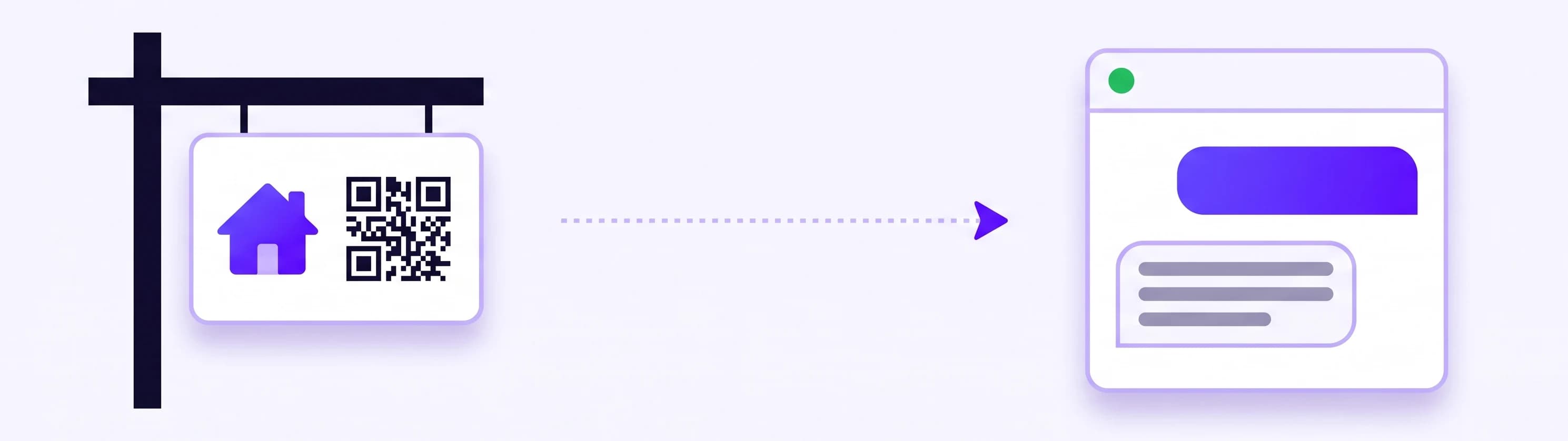
The same AI, with the same knowledge and rules, also answers Instagram DMs and Facebook Messenger, where many buyers send a message after seeing a listing post; there it answers in text, while listing cards show on your website chat and chat link. On Messenger and Instagram you can pause the AI on one conversation and reply from the portal yourself.
Is it illegal to use AI in real estate? Fair housing rules for the AI
Not in itself. No federal law bars using AI to answer buyers, but what it says is held to the same rules as what you say, and some states add their own AI or disclosure rules. The Fair Housing Act bars discrimination because of race, color, national origin, religion, sex, familial status or disability (HUD's overview). HUD's rule on discriminatory advertisements, statements and notices covers written and oral statements by anyone selling or renting a home, including any that indicate a preference or limitation. A reply in your website chat is your statement.
What changed: HUD's 2024 guidance on housing ads through digital platforms, including AI-driven targeting, was withdrawn effective September 17, 2025, as its Federal Register notice of April 6, 2026 records. The same notice says actions that do not comply with the text of the Act remain subject to enforcement. The extra guidance is gone; the law is not. Your state's license law and your MLS may add their own advertising rules.
In practice, give the AI these rules as behaviours before it goes live. Owner rules outrank its defaults:
- Never describe who lives in an area or who a home is "perfect for" ("great for young families"). Describe the property and the area's facts.
- Do not rate safety. Point to the local police department's published crime data.
- Do not rate schools or use them as shorthand for a neighborhood. Point to the school district's website and the state's school report cards.
- Never steer. Never leave out a listing that matches what the buyer asked for, say how many match, and never suggest areas based on anything about the buyer.
- Ask everyone the same qualifying questions, and never ask about family plans, religion, nationality or health.
- Hand over when in doubt, especially any request to avoid or prefer a group of people; when nobody is online, have it take contact details and say you will follow up.
- Pets are not the same as assistance animals. If a rental says no pets, the AI adds that requests for assistance animals are handled separately and offers to connect the renter with you.
A behaviour that covers most of it: "If a visitor asks whether an area is safe, who lives there, or how good the schools are, do not describe or rate it. Say that you follow fair housing rules, point them to the police department's crime data or the school district's website, and offer to connect them with Dana."
The website chat and the chat link also tell every visitor they are talking to an AI assistant before the first message, in eight European languages with English as the fallback. This section is practical guidance, not legal advice; when unsure about a rule in your state, ask your broker or a fair housing attorney.
What a real estate chatbot costs
Custom builds for brokerages are quoted as projects. A tool that runs on your own site has a public price, per AI agent, with teammates at no extra seat cost:
| Plan | Monthly | Yearly billing | AI responses per month | Site re-read |
|---|---|---|---|---|
| Smart | $29 | $19 per month | 500 | Re-crawl whenever you like |
| Boost | $59 | $39 per month | 2,000 | Monthly, automatic |
| Ultimo | $149 | $99 per month | 10,000 | Daily, automatic |
Every plan includes all channels, lead capture, the listings catalog, the scheduling apps and live chat. Only the AI's replies count, not yours, so if a conversation takes five AI replies, 500 responses cover about 100 conversations a month. If your listings change every week, Ultimo's daily re-read keeps your listing pages current in the chat; a listings catalog you uploaded or crawled does not refresh on its own, so replace it when a listing goes under contract or sells. Details on the pricing page.
The honest comparison is not a salary. It is the one buyer a month who asked about a listing at 10 pm, got no answer and called the next agent. Every plan starts with a 7-day free trial.
Set it up in an hour, then check three signals
An hour is realistic in this order:
- Install it from the Wix App Market, as the WordPress plugin or the Webflow app, or paste one snippet into any site builder that accepts custom code. The widget loads without blocking your page and runs in its own isolated layer.
- Add your site, your listings and the day-one documents, and on Boost or Ultimo switch on automatic re-reading with "Scan new links" and "Remove old links".
- Write two behaviours, qualification and fair housing. Copy the examples above and put your name in.
- Connect showings: Cal.com, Calendly, or Wix Bookings on a Wix site.
- Put alerts on your phone and set your online hours.
- Test it like a buyer. Open your chat link on your phone and ask the seven questions from the table above, plus "is it a safe area?". Every wrong or vague answer is a gap you close once.
If you would rather do it together, a free 15-minute setup call is bookable from the portal during your trial.
After a month, three signals tell you whether it works:
Leads outside your hours. Count the leads that arrived in the evening, at night and on weekends. None of them would have reached you through a contact form in time.
Showings that started in the chat. Count the showings whose buyer first appeared in a chat. That is the number to put next to the plan price.
Questions it could not answer. Read the chats where the AI offered to bring you in because the answer was missing. It is usually the same few things, such as HOA fees or what happens after an offer. Add them, and next month they are answered.
If buyers get answers at 10 pm, showings land in your calendar without a phone call, and hot leads reach you with budget and timeline already known, your AI assistant is doing the one job that matters: keeping you first in line while you are out showing homes.