

For two years I've been telling people the dream is full automation. The bot answers everything. You sleep. The leads come in.
I was half right. Most conversations should be automated, and most are. But there's a specific moment, maybe three or four times a week per bot, where automation is exactly the wrong answer and what the visitor actually needs is a person. Not a person trained to follow a script. A person who can read the room, change the offer, throw in a free month, ask a follow-up question the bot would never have thought of, and close.
We just shipped the feature that lets you be that person. It's called Live Chat, and it might be the most important thing we've added to Ultimo Bots since the day we launched.
The Problem with "Pure AI"
You've heard the marketing. Twenty-four-seven coverage. Ninety percent containment. Zero wait times. All true, all good, and all beside the point on the conversation that actually matters.
Here's the conversation that actually matters. A visitor lands on your pricing page at 3:14 PM. They ask about a feature. The bot answers correctly. They ask a second question. The bot answers correctly. They ask a third question — "is there any flexibility on the annual plan if we're a non-profit?" — and the bot says something polite and accurate and totally generic about reaching out to sales.
The visitor closes the tab. The visitor was a school district with a forty-seat budget approval already signed. You will never know they were there.
That conversation didn't need a smarter bot. It needed you, for ninety seconds, to type "yes — non-profits get 30% off, and I'd love to know more about what you're using it for." That's the entire fix. Ninety seconds of human, slotted into the right gap, would have changed the outcome of the day.
The Live Chat we just built is the slot.
Open the Live Inbox on Your Portal
What "Jumping In" Actually Looks Like
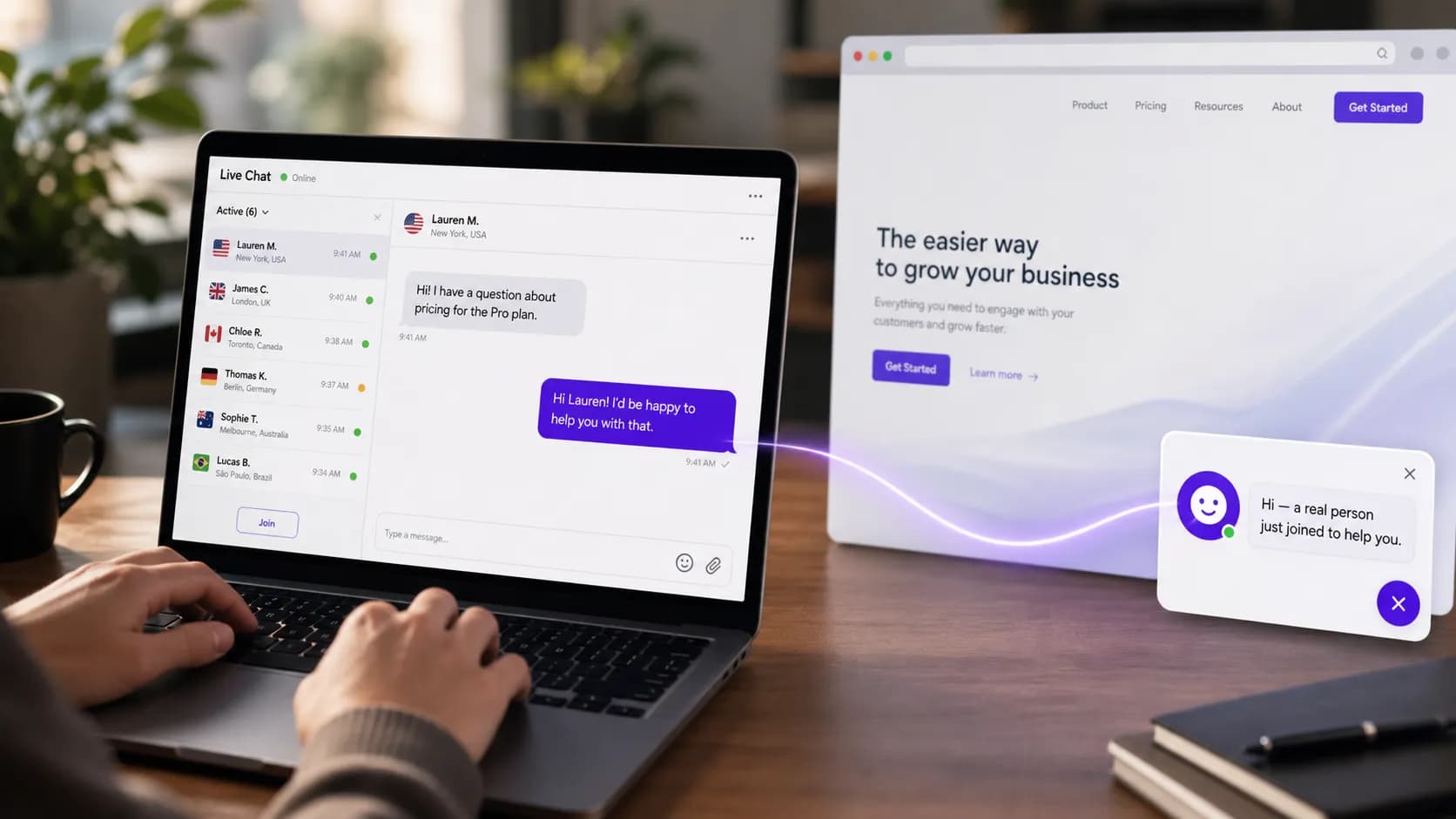
Open the Live Inbox tab in the portal. Every active conversation across every bot you own is there, listed by visitor, with a country flag (we resolve the IP), the page they're on, when they last said something, and a one-line preview of the most recent message.
You see a conversation that interests you. You click it. You read the whole transcript — it's already there, no loading screen — and you decide whether to watch or to step in. Watching is free; the AI keeps handling it. Stepping in means clicking Join.
The moment you click Join, four things happen, all of them invisible to the visitor unless you want them to be:
- The AI stops responding in that conversation. Not "tries to coordinate with you" — stops. There's no scenario where the bot says one thing and you say another and the visitor ends up confused.
- The widget on the visitor's screen quietly switches to "you're now talking to [your name]" — with your real display name, your real avatar, your real branding.
- A WebSocket handshake confirms the join in under a second. We added a "connecting" lock on the input box so you can't type into the void during that handshake — small detail, big difference when you fat-finger Enter on a slow connection.
- The conversation now lives in your phone, your inbox, your Slack, wherever you've configured the Notification Center to ping you. You can navigate away from
/liveand still get pinged for every visitor reply.
You type. They reply. You type again. The bot is gone. It's a chat between two humans, with no plugin overhead, no "the bot has handed you off" confusion, no double messages.
When you're done, you click Leave. There's a confirm dialog (we added it after the third time we accidentally bailed out of a conversation we cared about). The AI takes back over. The visitor gets a clean transition either way — we even handle the case where the visitor closes the widget mid-chat with a small "session ended" modal so you're not staring at a frozen panel wondering what happened.
The Translate Button That Quietly Doubles Your Sales Reach
Here's the feature I didn't realize would be the killer one until we shipped it.
The visitor types in Portuguese. You don't speak Portuguese. In every other tool I've ever used, this is where the conversation ends — you copy-paste into Google Translate, lose context, type a reply, paste back, send something that reads like a translation because it is one. The visitor feels it. The conversation goes flat.
Inside our Live Inbox, every visitor message has a small flag next to it. Tap the flag, pick your language, and the message translates right there in the chat bubble — original one tap away whenever you want to double-check. You read in your language. You write back in your language. Then, before you hit Send, you tap the flag next to the send button and your reply gets translated into the visitor's language, in the same textbox, ready for one last edit.
You can edit the translation before sending. You probably should. Translation is good, not perfect, and the small adjustments (a name, a product term, a bit of warmth) are what make the visitor feel they're talking to a human and not a Chrome extension.
The agent assist also covers AI-suggested replies. You're staring at a tricky question, you don't know how to start, you click Suggest, and the AI writes a draft that uses the bot's actual knowledge base (so the suggestion is grounded in your real content, not generic boilerplate). You edit it. You send it. You sound like you. You also sound like you knew the answer.
A note on tiers, because we try to be honest about gating: in-place translation requires the Smart plan or higher. AI-suggested replies require Boost or higher. We chose those bars because both features burn measurable model credits and we'd rather price honestly than ship a feature you discover is metered after the fact. Everything else in the Live Inbox — joining, replying, the visitor presence dots, the unread counts, country flags, transcript history — is on every plan, including the free one.
Try the Live Inbox on Your Bot Now
The Small Details That Took Most of the Engineering Time
If you're shopping around, these are the things you don't notice in a screenshot but feel within ten minutes of using the product.
Visitor presence dots. Green if the visitor sent or received something in the last twenty seconds. Yellow up to forty-five seconds. Grey beyond that. So you instantly see whether the person you're about to message is staring at the chat or has moved on. Trivial-looking, hugely useful when you're triaging six conversations.
Visitor typing indicator. Three dots, real-time, exactly like you'd expect from any messenger built in the last decade. We're surprised how many "live chat for chatbots" tools still don't have this.
Unread counts. Persistent across page refreshes, scoped per conversation. The list re-sorts so unread stuff floats to the top. The badge on the Live Inbox tab is accurate — no phantom counts, no zeroes that should be ones.
Country flags via geo-IP. Same flags the analytics tab uses, populated lazily so the list paints fast. Useful for routing, useful for tone, useful for noticing that 60% of your support load is coming from one country you weren't targeting.
A WebSocket-first architecture with HTTP polling as a real fallback. Most "real-time" features in SaaS are really "near-real-time, sometimes, when the network's good." We poll as a backup so that if the WebSocket drops on a flaky café Wi-Fi, you don't miss a message. When the socket is healthy, the poll quietly slows down to once every forty-five seconds so we're not wasting your battery.
Read receipts the visitor doesn't pay for. When you read a visitor's message, the widget knows. We use it to drive the unread badge logic on both sides. We don't surface "seen at 3:14 PM" to the visitor by default because the room for that to feel creepy is too big.
The Settings Panel: Schedules, Avatars, and the Offline Message
We didn't just build the inbox. We built the settings around it, because "live chat" without availability rules is just a perpetual obligation.
Open Live Chat Settings on any bot and you'll find:
- Availability mode. Manual (you toggle online/offline yourself, with a 30-second heartbeat keeping the server honest about whether you're actually still there) or Schedule (Mon 09:00–17:00, etc., per day, weekends off by default).
- The "Talk to a human" button. You decide whether the bot offers it, and you decide what it says. Some brands want "Speak with our team," some want "Get a human," some want it off entirely on certain bots. It's a setting, not a hardcode.
- Agent response timeout. Between 30 and 500 seconds, you set how long the visitor waits for you before the bot apologizes and offers to take a message. Too short and you'll always lose the race. Too long and the visitor disengages. Default is 120 seconds and most teams should leave it there.
- Offline message. What the bot says when you're not around. Customize it — your visitors can tell when an offline message is the platform default.
- Agent display name and avatar. This is the bit that surprises people. You can pick from three preset avatars (a person, a headset, a smiley face) and tint each one in your brand color. Or upload a real photo. Or just type a display name and let the initials show. Either way, it's your face on the conversation, not a generic "Support" badge.
The point of all this is that the live feature should feel like part of your brand, not a third-party widget bolted on. The same standard we've held for the bot itself, applied to the human side of it.
Configure Live Chat for Your Bot
The Math on When You Should Actually Use This
A short, honest framework, because not every business needs to staff a live inbox.
You probably don't need it if: your bot answers FAQs for a documentation site, your conversion model is self-serve and low-touch, and your "leads" are signups not sales calls. The bot is enough. Don't create work for yourself.
You almost certainly need it if: your average customer value is above a few hundred dollars a year, your sales process involves humans at any point, and your bot's traffic includes pricing-page visitors. Those visitors are the most valuable conversations you'll have all month, and giving them a human exit when they ask for one will pay for the entire platform on a single closed deal.
You need it badly if: you sell B2B, you sell to non-profits, you sell to schools, you sell internationally, or you sell anything where "is there any flexibility on…" is a question you've answered out loud at least once this year. The translate-in-place feature alone is worth the upgrade for anyone selling outside their own language.
How to Try It in the Next Five Minutes
If you already have a bot:
- Sign in to the portal. Click Live in the left nav.
- If you've never enabled it, the panel will offer to set up the agent profile (display name, avatar) for you. One screen.
- Open a fresh tab to your live site. Open the chatbot. Pretend to be a visitor — ask a question, then click the "Talk to a human" button.
- Watch the conversation appear in your Live Inbox in real time. Click Join. Reply.
- Walk away from the desk. Trigger another visitor message from your phone. Watch the Telegram notification land (assuming you wired up the Notification Center — and you should).
That's it. No installs, no integrations, no upgrades. Live Chat is on every plan, and the agent assist features unlock on Smart and Boost respectively.
If you don't have a bot yet, the whole arc — bot trained on your real content, branded widget on your live site, live inbox open on your phone — takes about as long as a coffee break.
Build Your Bot and Open the Live Inbox
What This Means for the Roadmap
Live Chat is the foundation for a few things we're building next.
The first is voice — the same join-this-conversation moment, but for live phone calls into a bot. The same translate-in-place, the same handoff, with a real-time speech layer on top. The plumbing under the Live Inbox was built with that in mind.
The second is multi-agent routing. Right now, anyone with portal access to a bot can join any of its conversations. Next, you'll be able to route specific event types (a "talk to a human" request from the pricing page, say) to a specific agent or group, the same way the Notification Center routes to channels.
The third is canned replies and team-shared snippets. The kind of small productivity layer that turns a power user into a team.
All of those are coming. None of them require you to wait. The thing that closes the deal — a person, in the right moment, with the right context, on the visitor's screen — is live now.